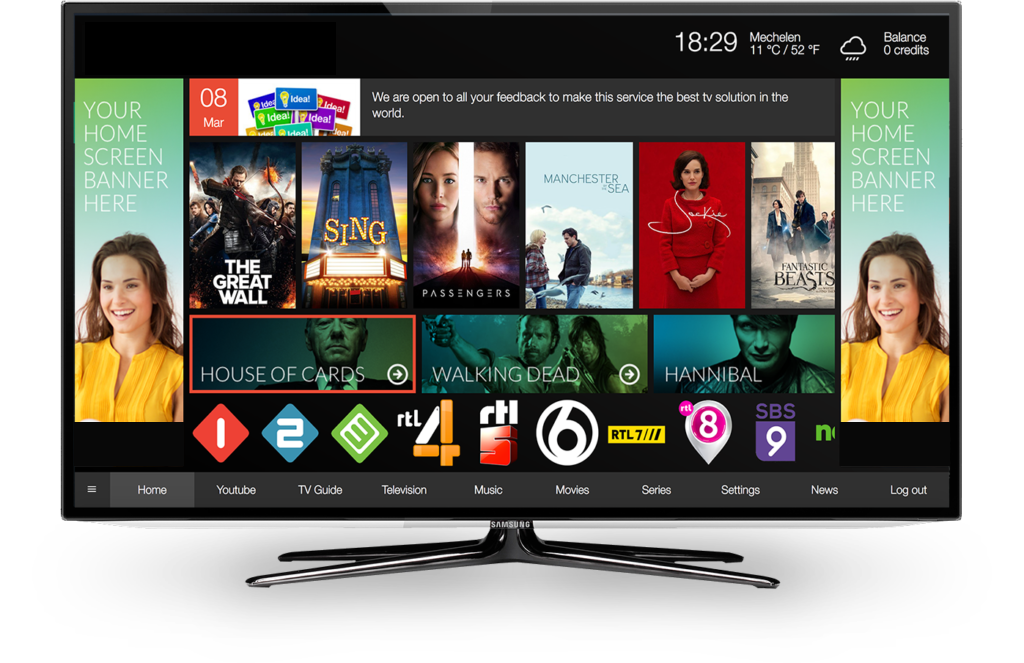
Advanced Media Player for
Smart TVs
Fast, Secure, and Easy-to-Use Media Playback
Add your playlist NOWZip TV Player – Advanced Media Player for Smart TVs
Zip TV Player is a modern media player application designed for Smart TVs, delivering a smooth, fast, and customizable playback experience. Our goal is to provide users with an easy-to-use platform for managing and playing their own legally obtained media playlists on supported devices.
The application is compatible with a wide range of Smart TV platforms, including Samsung (Tizen & Orsay), LG (webOS & Netcast), Philips, Panasonic, Vestel, VIDAA, Foxxum, NetRange, and other supported operating systems. With an intuitive interface, fast navigation, and customizable themes, Zip TV Player offers a reliable entertainment experience across multiple devices.
Zip TV Player supports standard playlist formats such as M3U and Xtream Codes API for users who have access to their own authorized media sources. The application does not provide, host, create, sell, or distribute any television channels, video content, playlists, or streaming services. Users are solely responsible for the content they add to the application and must ensure they have the legal rights to access and use that content.
Additional features include multi-device management, parental controls, multilingual support, personalized themes, and high-performance playback designed to enhance the user experience.
At Zip TV Player, we are committed to providing a secure, reliable, and user-friendly media player while respecting copyright laws and applicable regulations.
Zip TV Player is a modern media player designed for Smart TVs, delivering a clean interface, fast navigation, and a customizable playback experience. The application allows users to organize and play their own legally authorized media using supported playlist formats.
Important: Zip TV Player is a standalone media player only. We do not provide, host, sell, distribute, or promote television channels, streaming services, playlists, or copyrighted content. Users are solely responsible for the content they import and must ensure they have the legal rights and authorization to access and use it.
Powerful Features

Smart Search
Quickly search your imported media library with fast and responsive search functionality.

Multi-Language Support
Use Zip TV Player in multiple languages, including English, French, Spanish, Arabic, Russian, and more.

Multi-Device Management
Manage your licensed devices and enjoy a consistent experience across supported Smart TV platforms.

Parental Controls
Protect your viewing experience with PIN-based parental controls and customizable content restrictions.

Audio & Subtitle Support
Select from available audio tracks and subtitles included within your imported media.

Continue Watching
Resume playback from where you left off and continue enjoying your media across your registered devices.
Get Started
Start with Zip TV Player in a few simple steps. Follow our guide to set up your Media player experience.

Step 1 – Find Your Device Information
Open the Zip TV Player application and navigate to Settings to locate your Device ID, Device Key, and App Version. These details are required for device activation and license management.

Step 2 – Import Your Playlist
Import your own legally authorized playlist using one of the supported formats, including M3U Playlist or Xtream Codes API, supplied by your authorized content provider.

Step 3 – Enjoy Your Media
Browse, organize, and play your personal media library using Zip TV Player's fast and user-friendly interface.
Why Choose Zip TV Player?
- Modern and intuitive Smart TV interface
- Fast and responsive media playback
- Support for popular playlist formats
- Multi-language interface
- Secure parental controls
- Multi-device license management
- Audio and subtitle support
- Regular software improvements and updates
- Reliable performance with an easy-to-use experience
Legal Notice
Zip TV Player is a media player application intended for playing user-provided content. The application does not include, supply, host, or distribute any media, television channels, playlists, or streaming services. Users are responsible for ensuring they have the necessary rights and permissions to access and use any content imported into the application. Zip TV Player respects intellectual property rights and complies with applicable copyright laws.
© Copyright 2026 Zip TV Player. All Rights Reserved